
Introducing the /refine skill that helps you audit and improve your Claude Code setup. After spending time pulling apart and analyzing the Claude Code skills that consistently produce better output than others, I realized that the key to high-quality AI-generated code lies in a set of shared constraints and maximizing the configuration surface area.
Claude Code supports skills, subagents, hooks, MCP servers, path-scoped rules, progressive disclosure, auto-memory, and a bunch of other configuration levers that usually aren’t used to their full potential.
We have come quite far from the early days of prompt engineering, where people were focused on crafting the perfect prompt. Now, the configuration around the prompt is just as important, if not more so. This configuration surface area is huge, and the best practices are spread across docs, community skills, and trial and error.
Here comes the /refine tool which can help you find the gaps by auditing your setup across 8 dimensions and interview you to suggest apt improvements that could improve the Claude Code output.
The /frontend-design skill for example, generates distinctive UI instead of generic AI-looking interfaces. The /systematic-debugging skill finds root causes instead of slapping band-aids on symptoms. The /brainstorming skill blocks implementation until you approve a design.
These are very different skills solving very different problems, but they share the same underlying structure. The pattern is constraint-driven prompting, and it explains why the right configuration and well structured context matters so much.
Here’s what I found after going through the top 30 skills on skills.sh to find common patterns how they best achieve their results:
Constraints are more effective than instructions. Telling Claude “write clean code” leaves the door open for every default behavior it falls back on. Telling Claude “NEVER do this and that” closes a specific door. Anti-patterns give Claude hard boundaries. Positive instructions are suggestions. The best skills are full of “NEVER do X” rules, and it’s the single biggest reason their output stands out. Applying this same approach to your CLAUDE.md and other definitions makes a measurable difference.
Gates force Claude to think before acting. Left to its own devices, Claude will jump to writing code the moment it thinks it understands the problem. The best skills prevent this with hard checkpoints. The systematic-debugging skill has what it calls an “Iron Law”: no fix without root cause investigation first. The brainstorming skill won’t let Claude touch code until you’ve approved a design. These gates are what separate a skill that produces thoughtful output from one that produces fast but shallow output. The same idea applies to project configuration: hooks, validation loops, and phased workflows all act as gates.
Using context wisely. The instinct is to put everything Claude might need into CLAUDE.md upfront. The best skills do the opposite. They keep the main instructions lean and store deeper knowledge in reference files that get loaded only when relevant. A massive CLAUDE.md eats into your context window before Claude has even started working on your task. Progressive disclosure, giving Claude the right knowledge at the right time, is how the best skills stay effective without blowing through tokens.
Rules without intent aren’t enough. The frontend-design skill doesn’t just ban generic fonts and gate the workflow. Before any code is written, it asks: what problem does this solve? Who uses it? What makes it unforgettable? That’s not a constraint or a gate. That’s gathering direction. Without it, even a well-constrained Claude is guessing at the goal. This is why /refine interviews you about the gaps it finds. The skill needs to understand what you’re building and how you work before it can recommend anything worth implementing.
These aren’t patterns I invented. They’re what I found by studying the top community skills on skills.sh and the official Anthropic documentation. /refine takes these same patterns and applies them to your project’s Claude Code configuration itself.
What an Audit Looks Like
Here’s what an actual /refine audit report looks like:
| # | Dimension            | Score | Evidence                                    |
|---|----------------------|-------|---------------------------------------------|
| 1 | CLAUDE.md Quality    | 2/3   | Good structure, missing anti-patterns        |
| 2 | Development Workflow | 3/3   | All commands present and documented          |
| 3 | Skills Coverage      | 2/3   | 6 skills, but no reference files in 2        |
| 4 | Agent Architecture   | 2/3   | 5 agents with clear specializations          |
| 5 | Automation (Hooks)   | 1/3   | Only test hook, no typecheck or lint hooks   |
| 6 | Tool Integration     | 0/3   | No MCP servers configured                    |
| 7 | Guard Rails          | 2/3   | Anti-patterns in CLAUDE.md, not in skills    |
| 8 | Context Efficiency   | 2/3   | Good splitting, CLAUDE.md slightly long      |
|   | TOTAL                | 14/24 | Grade: C                                     |
Every score is backed by specific evidence from your project. Most projects I’ve run this on start around a C or D, which is totally normal. When I first started using Claude Code, my setup was a CLAUDE.md and a couple of custom commands. It worked fine, but I had no idea how much I was leaving unconfigured.
The 8 Dimensions
/refine evaluates your project across 8 dimensions, each scored from 0 to 3:
| Dimension | What It Measures |
|---|---|
| CLAUDE.md Quality | Structure, specificity, anti-patterns, tech stack documentation |
| Development Workflow | Test/lint/build commands, slash commands for common workflows |
| Skills Coverage | Domain knowledge capture, design systems, repeated pattern handling |
| Agent Architecture | Specialization, delegation rules, team structure |
| Automation (Hooks) | PostToolUse testing, validation loops, Stop hooks |
| Tool Integration | MCP servers, permissions, external tool access |
| Guard Rails | Anti-patterns specified, path-scoped rules, safety nets |
| Context Efficiency | Progressive disclosure, reference splitting, token budget awareness |
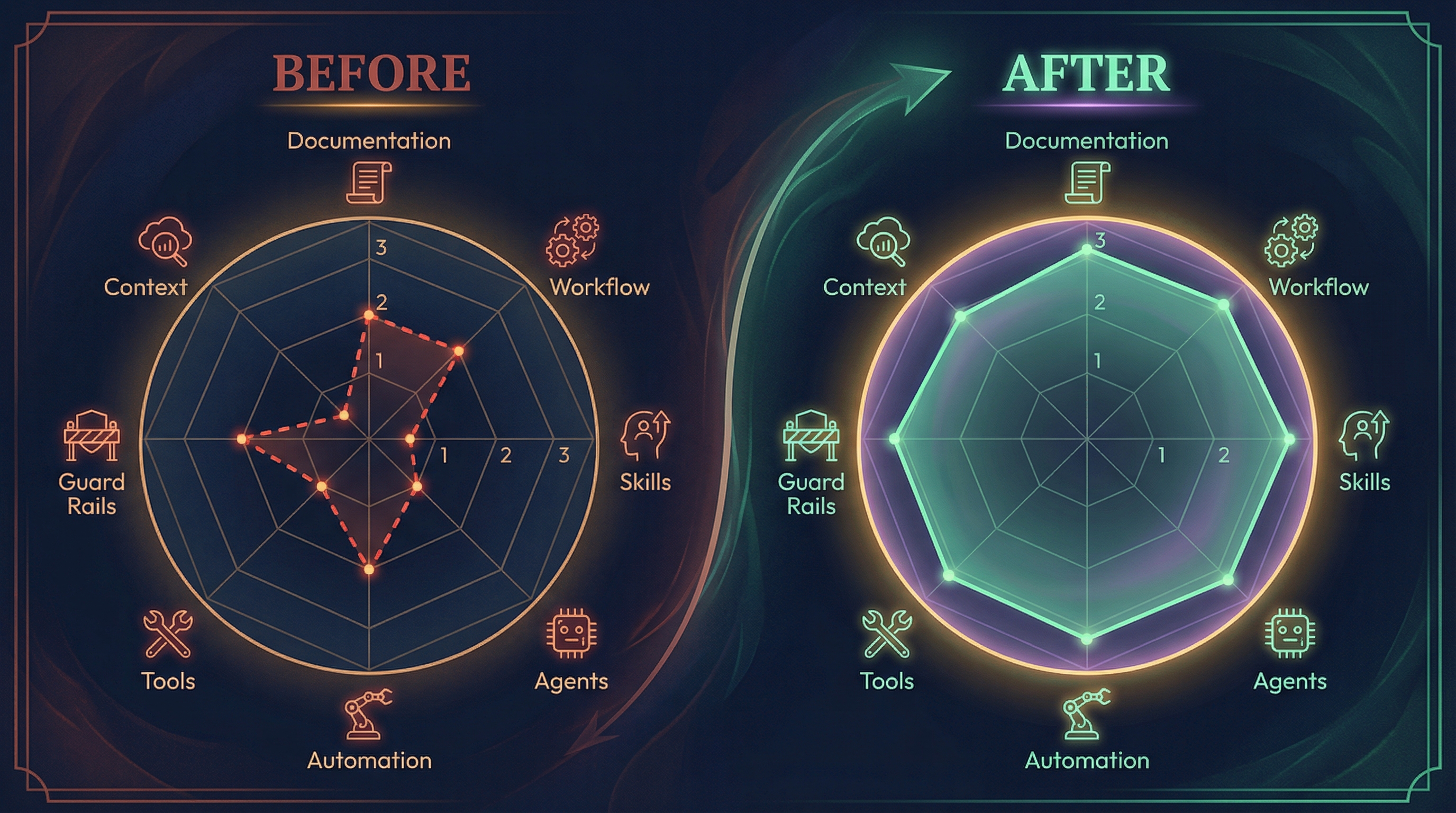
Scores are summed to a total out of 24 and mapped to a letter grade:
| Score | Grade |
|---|---|
| 21-24 | A |
| 17-20 | B |
| 12-16 | C |
| 7-11 | D |
| 0-6 | F |
The 4-Phase Workflow
When you run the full /refine, it moves through four gated phases:

Phase 1: Scan
The skill reads your entire project configuration: CLAUDE.md, .claude/ directory structure, settings files, hooks, skills, agents, and MCP server configs. It builds a complete picture of what’s there and what’s not.
Phase 2: Score
Each of the 8 dimensions gets a score from 0 to 3 based on a detailed rubric. You get a breakdown showing where you’re strong and where the gaps are, plus an overall letter grade.
Phase 3: Interview
This is what separates /refine from a static linter. /refine asks targeted questions about what it found, so the improvements actually match how you work. For example, if it finds you have no hooks configured, it won’t just add generic ones. The hooks it generates come from your answers coupled with best Claude Code configuration practices, not from a template.
Phase 4: Implement
Based on your scores and interview responses, /refine generates and applies configuration changes. Changes are ordered by impact: CLAUDE.md improvements first, then workflow commands, guard rails, skills, hooks, agents, MCP servers, and settings last.
Like it so far?
Try it out on your Claude Code setup by installing the skill:
npx skills add meetdave3/refine-skill/refine ships with three modes:
/refine          # Full 4-phase workflow: scan, score, interview, implement
/refine audit    # Read-only report with scores and recommendations
/refine quick    # Scan, score, then implement the top 3 fixes automatically
Start with /refine audit to get a baseline score without changing anything. Once you see where you stand, run the full /refine to implement improvements. /refine quick skips the interview and goes straight to the highest-impact fixes if you want something faster (maybe run it in an existing conversation where you want to make quick adjustments based on that chat?)
The full source is on GitHub if you want to see the scoring rubric or contribute.
Run /refine audit on your project and see if you’re making most of Claude Code.